See whether AI assistants mention you
Before you start
Section titled “Before you start”- Confirm your website first, in Setup step 1 (Your company & website). AI Visibility needs it to know which answers mention you.
- AI Visibility is included in Plunk Commerce.
- Open Apps and click AI Visibility.
- Click Add questions and enter the questions buyers ask, one per line. For example: “Best place to buy a leather sofa near me”.
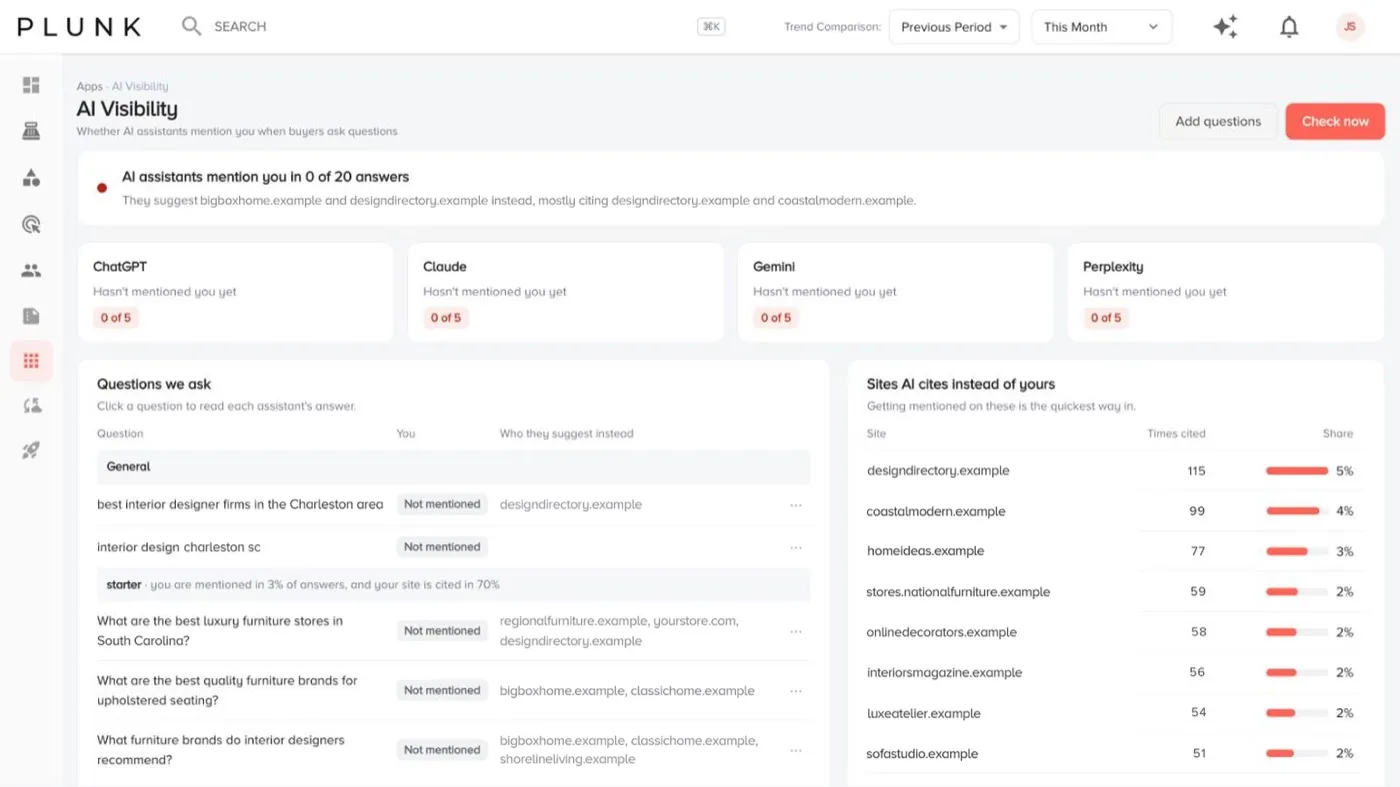
- Click Check now. The summary shows how many answers mention you.
- Read Questions we ask. Each question shows whether assistants mention you every time, for some questions, by name only, or haven’t mentioned you yet, and who they suggest instead.
- Click a question to read each assistant’s answer, marked as mentioned you and linked to your site, mentioned you, or didn’t mention you.
- Check Sites AI cites instead of yours to see where assistants get their answers.
Check for old names or claims
Section titled “Check for old names or claims”Use Answer audit. Enter a name or phrase, such as an old product name or a discontinued offer, and click Search answers to see whether assistants still repeat it.
If something looks off
Section titled “If something looks off”- It says it needs your site. Confirm your website in Setup (Your company & website), then check again.
- Results change between checks. AI answers vary from day to day. Look at the trend over several checks, not one.
Related
Section titled “Related”Was this helpful?
Still stuck? Contact support and include the job or page you were on.