Track where you rank in search
Before you start
Section titled “Before you start”- Keyword Intelligence is included in Plunk Commerce.
- Know a few competitors’ websites if you want share of voice.
- Open Apps and click Keyword Intelligence.
- Click Add keywords. Enter your terms, and optionally a group name and the page you want to rank.
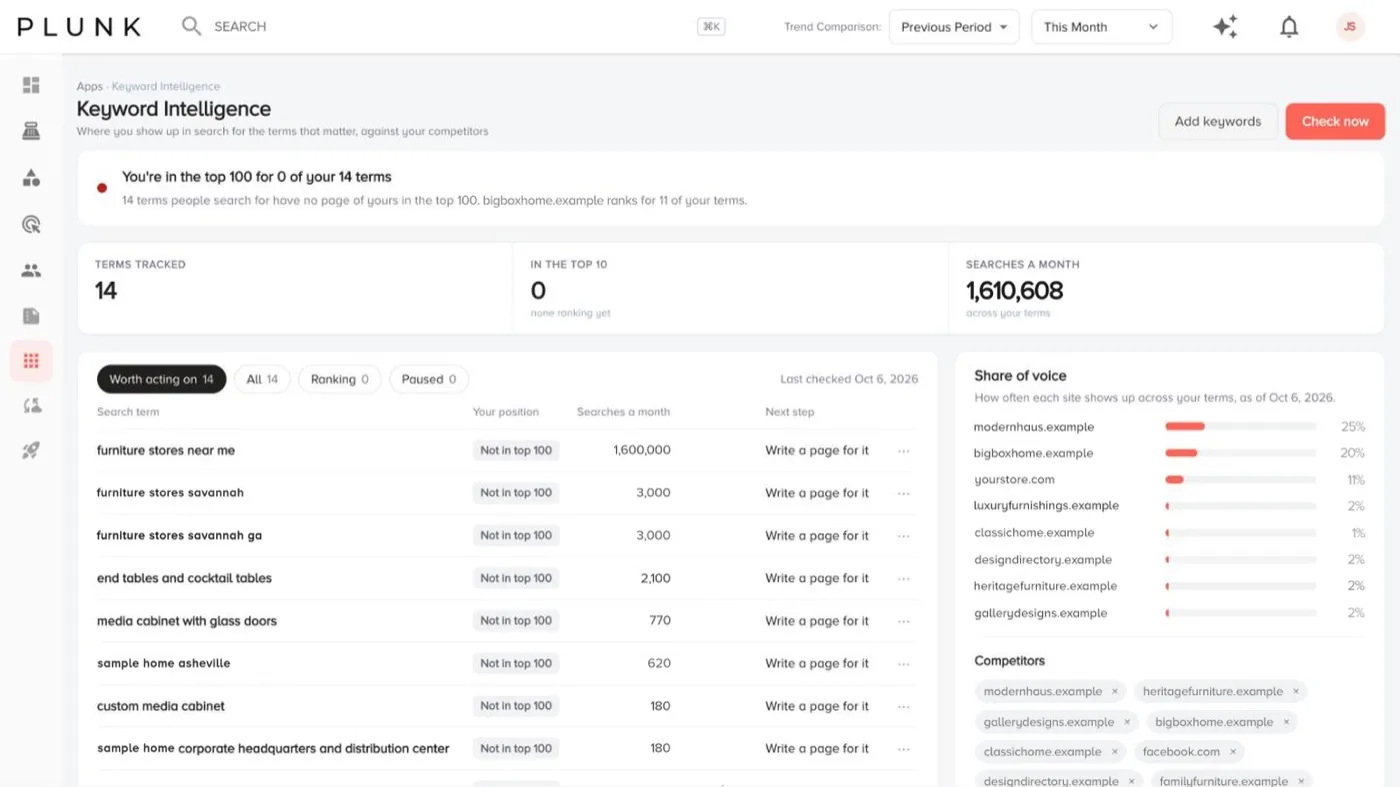
- Click Check now. The tiles show terms tracked, how many are in the top 10 and searches a month.
- Filter with Worth acting on, All, Ranking or Paused.
- Read each row: your position in Google and Bing, searches a month and the next step.
- Add competitors under Share of voice to see how often each of you shows up.
- Click a term to see its position over time and recent checks.
Other sections
Section titled “Other sections”- Pages getting in each other’s way lists terms where two of your own pages compete, so neither ranks as well as one would.
- Terms worth tracking suggests terms to add. Click Track to add one.
If something looks off
Section titled “If something looks off”- A term shows no position. You don’t rank in the results Plunk checks for that term yet.
- Positions jump around. Search rankings move day to day. Use Position over time on the term’s page.
Related
Section titled “Related”Was this helpful?
Still stuck? Contact support and include the job or page you were on.