See which fabrics, finishes and options sell
Before you start
Section titled “Before you start”- Options come from the lines on your orders, so you need a sales feed that carries the option on each line, or sends options as their own lines. See Connect your data.
- Options fill in nightly as orders ship.
- Owners and administrators decide how order lines are read in Manage Data > Configuration Rules.
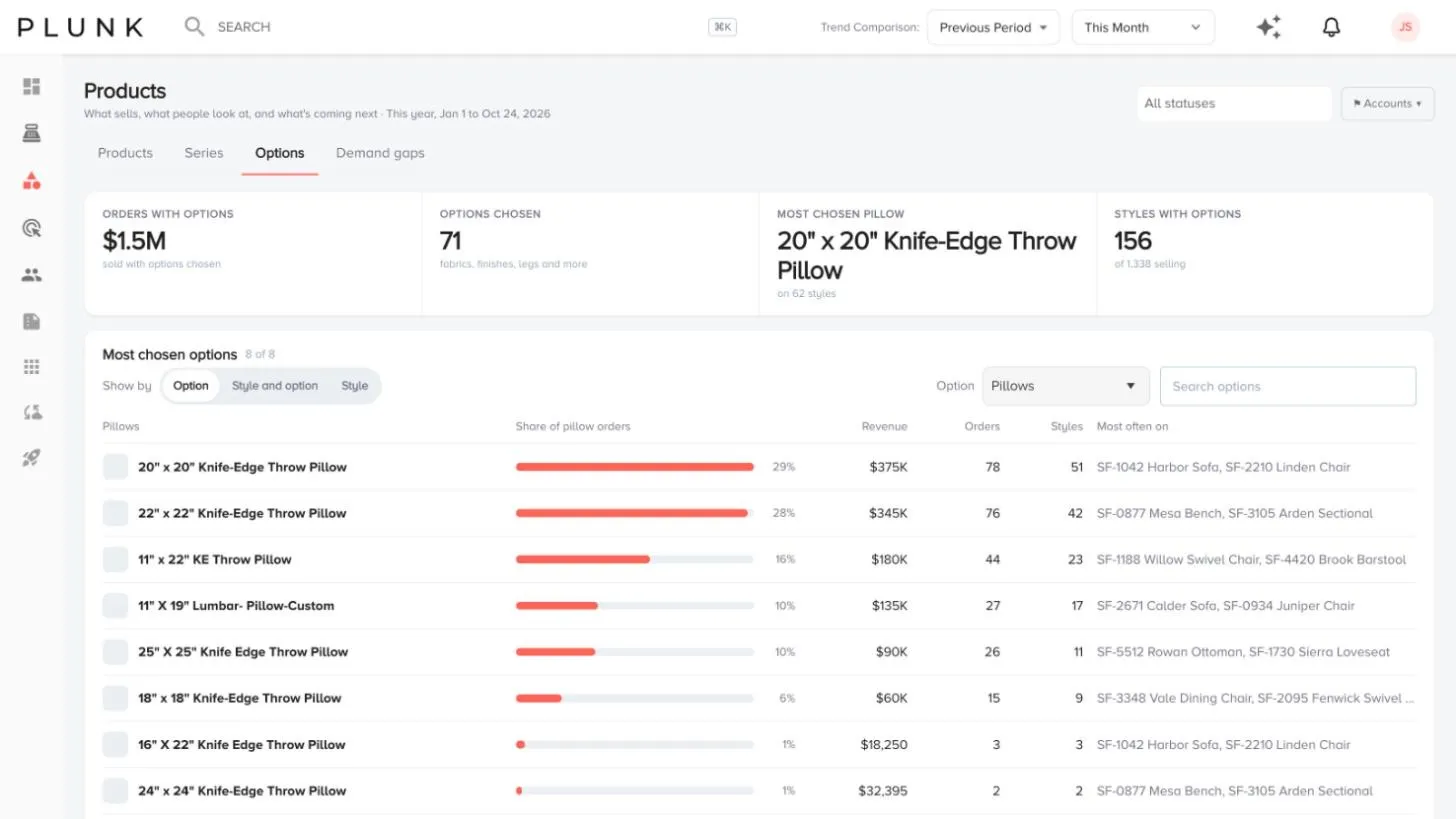
- Open Products > Explorer, then Options. The tiles show orders with options, options chosen, the most chosen fabric and how many styles have options.
- Pick Show by.
- Option lists the most chosen options, their share of orders and the style they’re most often on.
- Style and option shows each style with its options, revenue, orders and share of revenue.
- Style lists styles with units, revenue and orders.
- Choose the option kind from the Option menu (for example Fabric, Finish, Leather or Legs; the list follows your data).
- Filter by product type with the On menu, or search options or styles.
Set up how order lines are read
Section titled “Set up how order lines are read”Owners and administrators can open Manage Data > Configuration Rules. Each line on an order is a product, an option on a product, or something to ignore, like shipping. Plunk checks the rules from top to bottom and uses the first one that fits.
- Click + Add a rule, for example “When the SKU starts with 21, count it as Fabric”, or click Suggest rules.
- Click Test on recent orders to see how the rules read real lines.
- Under More settings, choose how options attach to products: on the same order, by a shared field, or not at all. You can also set the series pattern.
- Click Save and recalculate. The Options and Series tabs rebuild from your rules. Earlier versions lets you load an older set back into the editor.
If something looks off
Section titled “If something looks off”- The Options tab is empty. There may be no orders with options in this date range yet, or your feed doesn’t carry options. Try a longer range, then check your rules.
- Fabric shows up as a product. Add a rule that counts those SKUs as Fabric, then save and recalculate.
Related
Section titled “Related”Was this helpful?
Still stuck? Contact support and include the job or page you were on.