Compare paid reach and site visits by market
Before you start
Section titled “Before you start”- You need markets. Add them with Add market on this page or in Manage Data > Markets.
- Site visits come from the site tracker. Paid delivery comes from your campaigns.
- The date range and trend comparison in the top bar apply here.
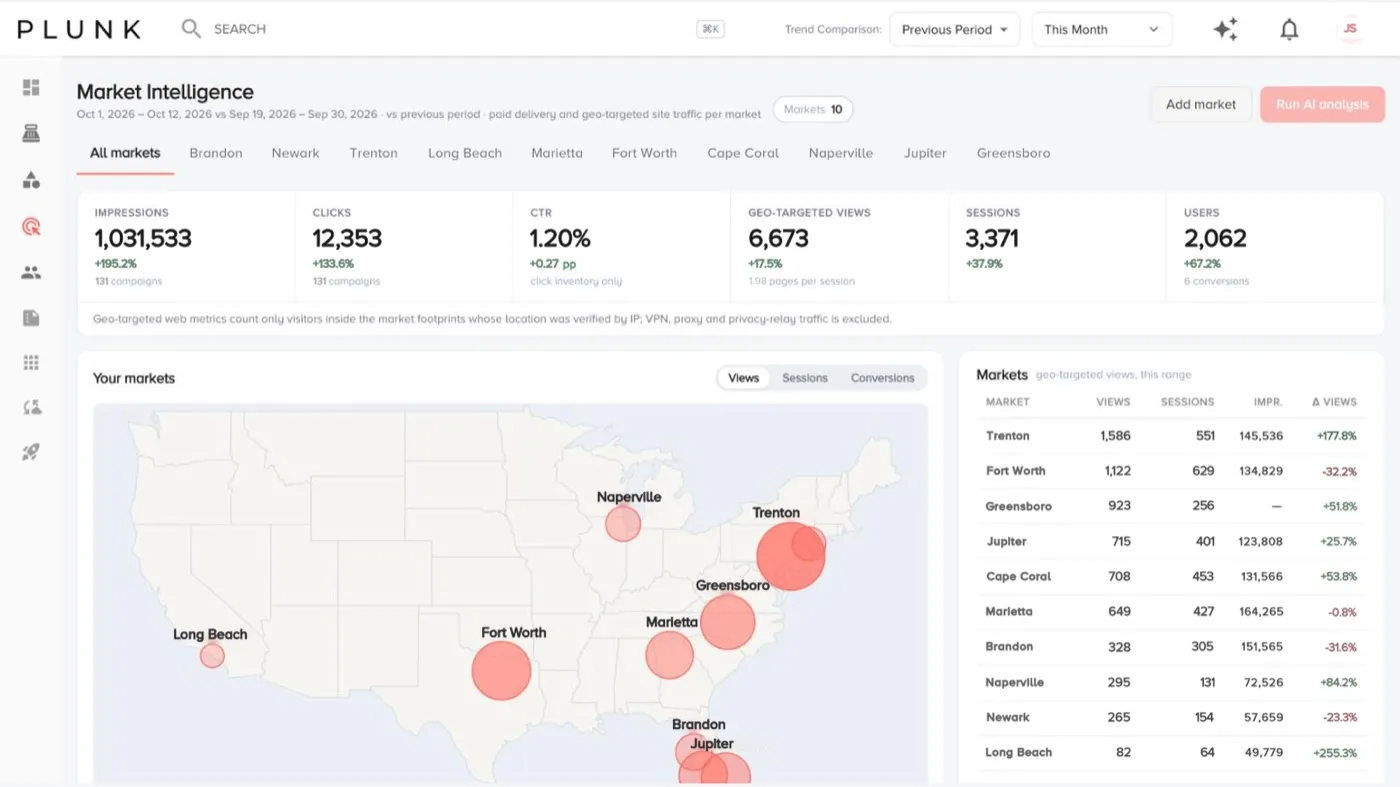
- Open Marketing > Market Intelligence. The All markets tab shows a map, every market side by side, campaigns by channel and top products.
- Pick a market tab. You see delivery by channel, top ZIP codes, maps, top products, top categories and an analysis.
- Click Run AI analysis on a market tab. The written analysis opens in a side panel. View last analysis reopens the most recent one.
If something looks off
Section titled “If something looks off”- It says No markets yet. Add one with Add market or in Manage Data > Markets.
- Run AI analysis is greyed out. It runs one market at a time. Pick a market tab first.
- Site visits look lower than in Website Analytics. This page only counts visits it can place inside a market.
Related
Section titled “Related”Was this helpful?
Still stuck? Contact support and include the job or page you were on.