Connect your data with the guided setup
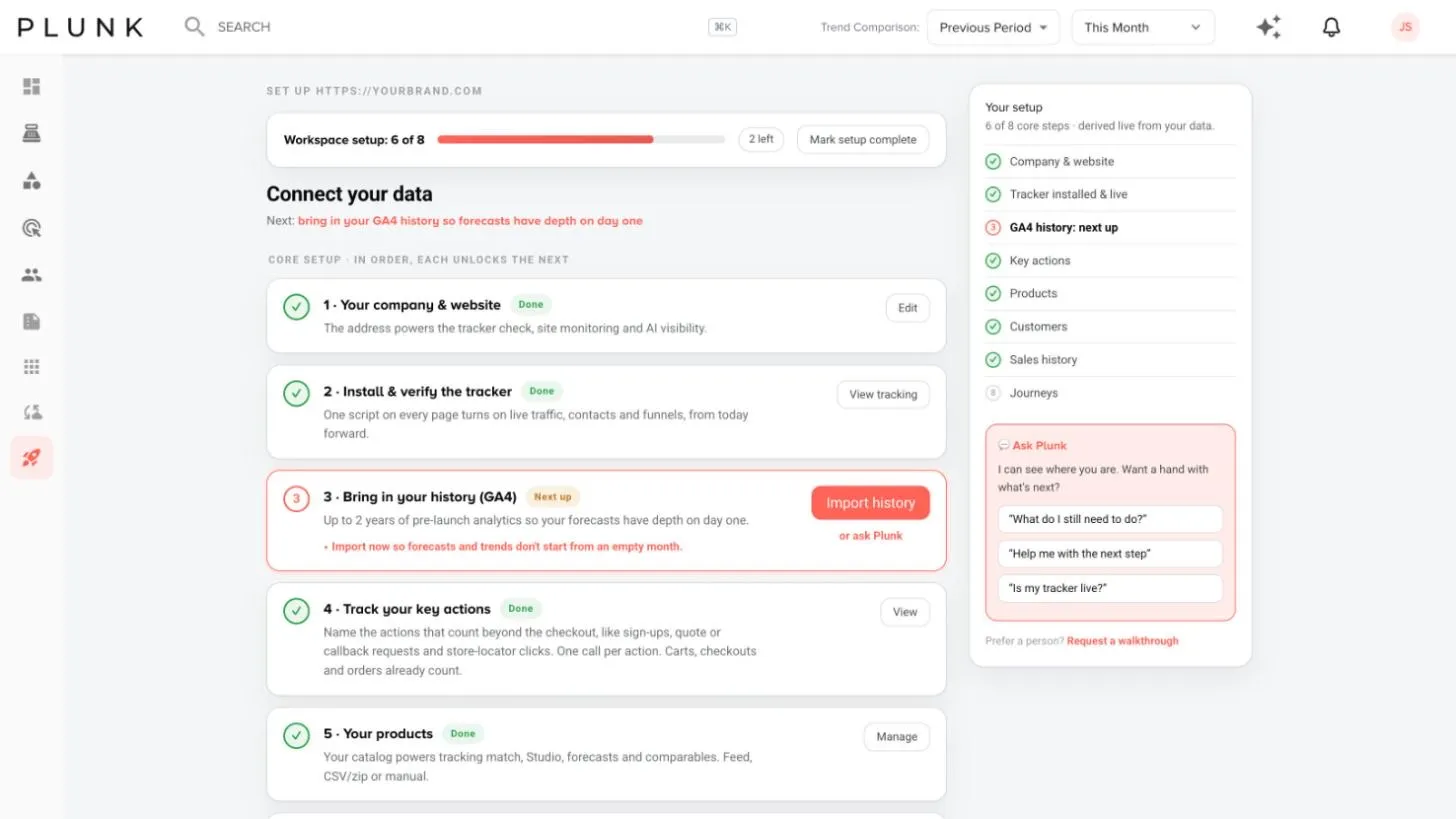
Before you start
Section titled “Before you start”- Setup takes about 10 minutes, and nothing in it is permanent.
- Have your website address ready, plus a product feed or file. Sales history is optional to start but turns on most of the sales screens.
- On Shopify? The steps are shorter. See On Shopify below.
- Your company & website. Click Confirm and check your site address. It powers the tracker check, site checks and AI Visibility.
- Install & verify the tracker. Click Set up tracking, copy the snippet into your site’s shared footer and scan your pages. See Install the site tracker.
- Bring in your history (GA4). Click Import history to bring in up to two years of analytics from before Plunk, so forecasts have depth on day one. See Import GA4 history.
- Track your key actions. Click Set up events and name the actions that matter, such as quote requests, sign-ups or dealer locator clicks. Plunk writes a small script your developer adds, one line per action.
- Your products. Click Connect and bring in your catalog as a daily feed, a file upload or a few by hand. A feed keeps itself current and powers product analytics, forecasts and Plunk Studio.
- Your customers. Connect a customer feed or file, or let contacts build themselves from the tracker as visitors identify themselves. Imports merge by email.
- Your sales history (optional). Click Connect feed. This is what joins interest to revenue: top sellers, forecast depth, territory, stores and option reporting all switch on with it.
- Set up your email journeys (optional). Review the starter journeys and turn them on.
The progress strip at the top shows how many steps are done. When you’re finished, the Setup item leaves the sidebar. Owners can also click Mark setup complete.
After the core steps
Section titled “After the core steps”Further down the Setup page, in any order:
- Tune your workspace: markets, lifecycle stages, option reporting and inventory.
- Sales setup (manufacturer view): price tiers, targets, territories and sales digests. In the retail view: store targets and the store digest.
- Before you send: your brand kit, verifying your sender domain and bringing over your unsubscribes.
- Turn on your marketing: activate starter emails, connect your channels, define your markets and let Autopilot draft your first flights.
On Shopify
Section titled “On Shopify”Connect your store once and products, orders (as sales), customers and inventory come in together.
- Click Connect Shopify on the Setup page.
- Review what Plunk needs access to and click Continue to connect.
- Enter your store domain (your-store.myshopify.com) and click Connect with Shopify.
- Choose your plan in Shopify. Your first sync starts straight away.
For the tracker, Shopify stores click Turn on theme embed instead of pasting a snippet.
If something looks off
Section titled “If something looks off”- A step won’t check off. Steps check themselves from real data, so a feed has to deliver once first. Open Manage Data to see its status. See My feed stopped updating
- The tracker step stays open. See The tracker isn’t recording visits
Related
Section titled “Related”Was this helpful?
Still stuck? Contact support and include the job or page you were on.