Build an email journey
Before you start
Section titled “Before you start”- Journeys need contacts with email addresses, so connect the site tracker and your customer feed. See Connect your data.
- Set up your sender and brand kit first. See Email composer and brand kit.
- Open Marketing > Email > Journeys and click New, then Journey.
- Pick a starting point: Welcome series, Came back to look again, Left something in the cart, Single email, Start from scratch or one of your templates.
- Choose what starts it under Starts when:
- Someone signs up
- Looks at products (and hasn’t bought yet)
- Leaves a cart
- Buys again
- Hasn’t bought in a while (90 days unless you change it)
- Might stop buying (ordering less often than usual)
- Something else on your site (any event your site tracks)
- Narrow who joins with Only people in and Leave out people in. The estimate shows how many people that is.
- Add steps: + Email, + Wait, + Split by what they did, + Tag them and + End here. A split checks whether they converted, opened the last email, did something on your site, are in a list, are at a stage or have a certain rep. The two paths never join back up.
- Choose when they stop: after the last step, as soon as they convert, or when they do something specific.
- Check Sending: the sender, quiet hours and the most emails one person gets in a day.
- Click Turn on. Plunk checks every step first: emails need a subject and content, waits need a length and splits need a condition.
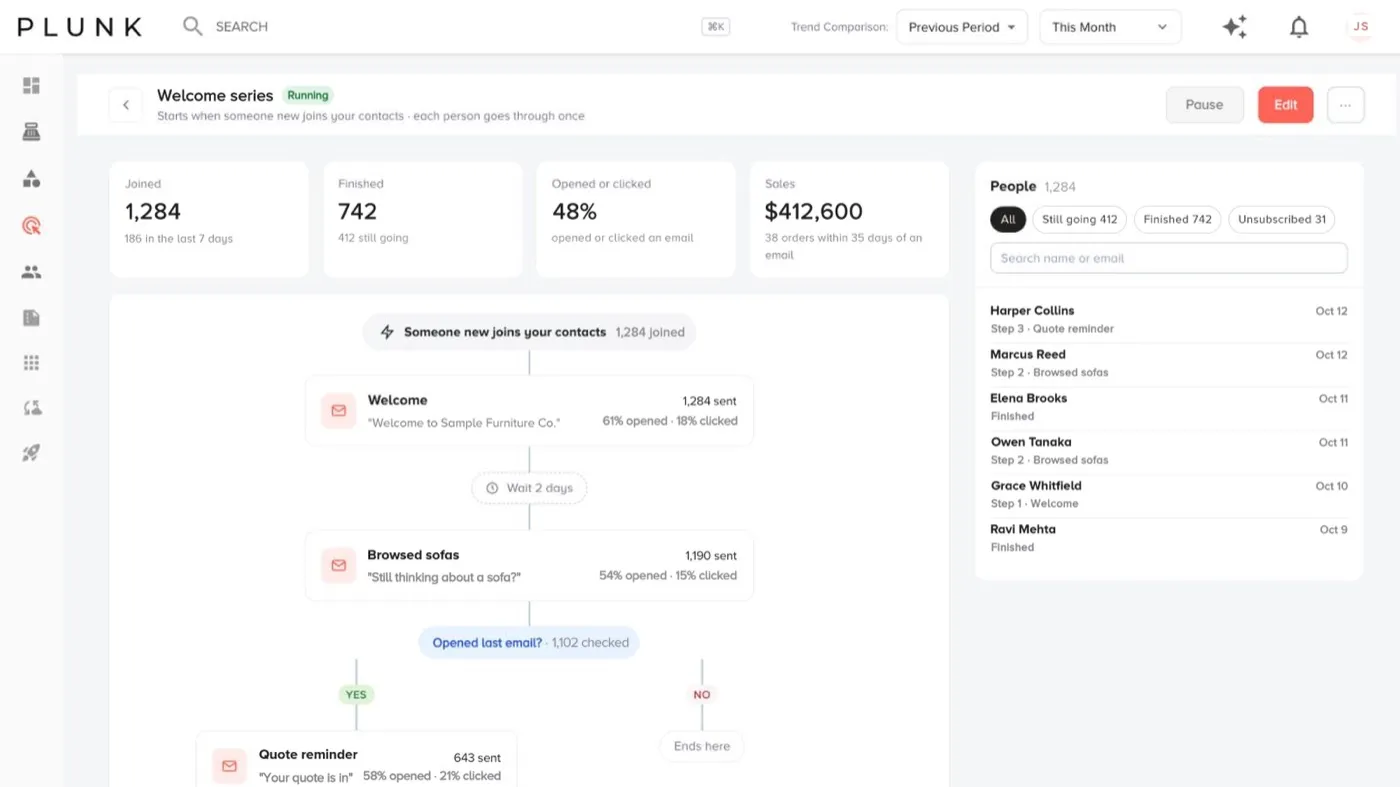
Watch a journey
Section titled “Watch a journey”The journey page shows who joined, who finished, who opened or clicked, and the sales that followed. The People list shows where each person is: still going, finished, reached the goal, unsubscribed or couldn’t send.
To change a running journey, click Pause to edit. People in it keep their place, and changes apply to their next step.
How journeys behave
Section titled “How journeys behave”- New people are checked every 5 minutes, and each person goes through once.
- People who unsubscribed never start, and anyone who opts out mid-journey leaves it.
- Emails due during quiet hours wait. The daily limit can make an email later, never earlier.
If something looks off
Section titled “If something looks off”- No one has joined in 2 weeks. Click Check the start. The trigger may be too narrow or your audience filter may leave everyone out.
- People aren’t getting emails. Check they agreed to get email and aren’t on the suppression list in Audiences.
Related
Section titled “Related”Was this helpful?
Still stuck? Contact support and include the job or page you were on.